10 november 2026 · düsseldorf
Desk Hub
Every feature written once, then one card that works out which one I meant.
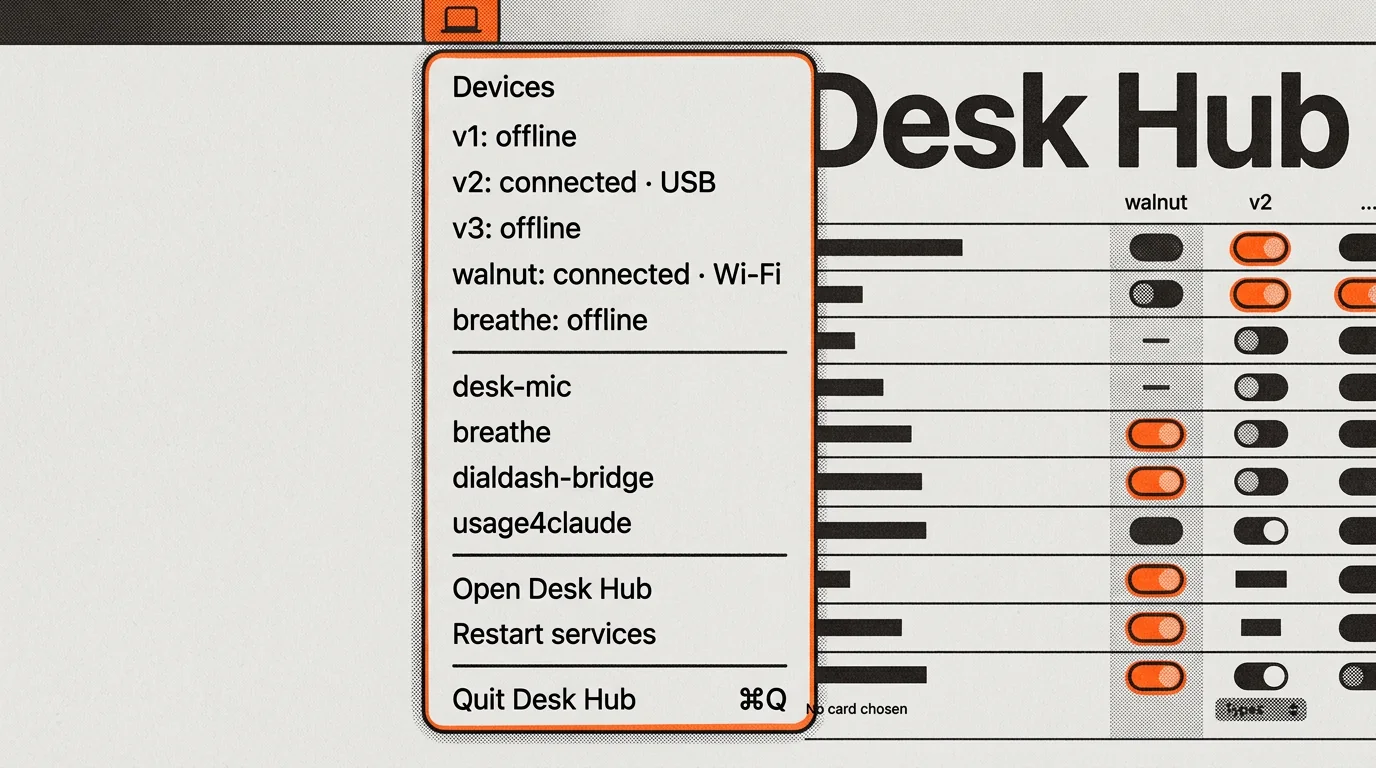
There are four devices on my desk that listen. Three are handhelds I printed, each about the size of a phone. The fourth is a head called walnut, with two feet on its base that I press. None of them think. They have a microphone, maybe a speaker, maybe a screen, maybe eight LEDs, and one control to step through a list.
Desk Hub is the Mac app behind all four. It is a menu-bar icon and one window. Every feature any of those devices can run is written once, in one catalog, and each device is offered only the parts its hardware can actually do. I hold a lever and talk; the words get typed where my cursor is, or answered out loud, or turned into a house command, or sent to someone, or kept in a diary.
Which of those happens is the interesting part, and for a while it was a decision I had to make before every sentence by turning a wheel to the right card. Now there is a card that makes it for me.
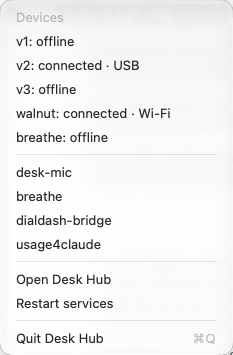
Four things on a desk
The three handhelds came in order, and each one is a different answer to the same question: how do you pick a thing to do without looking at the device?
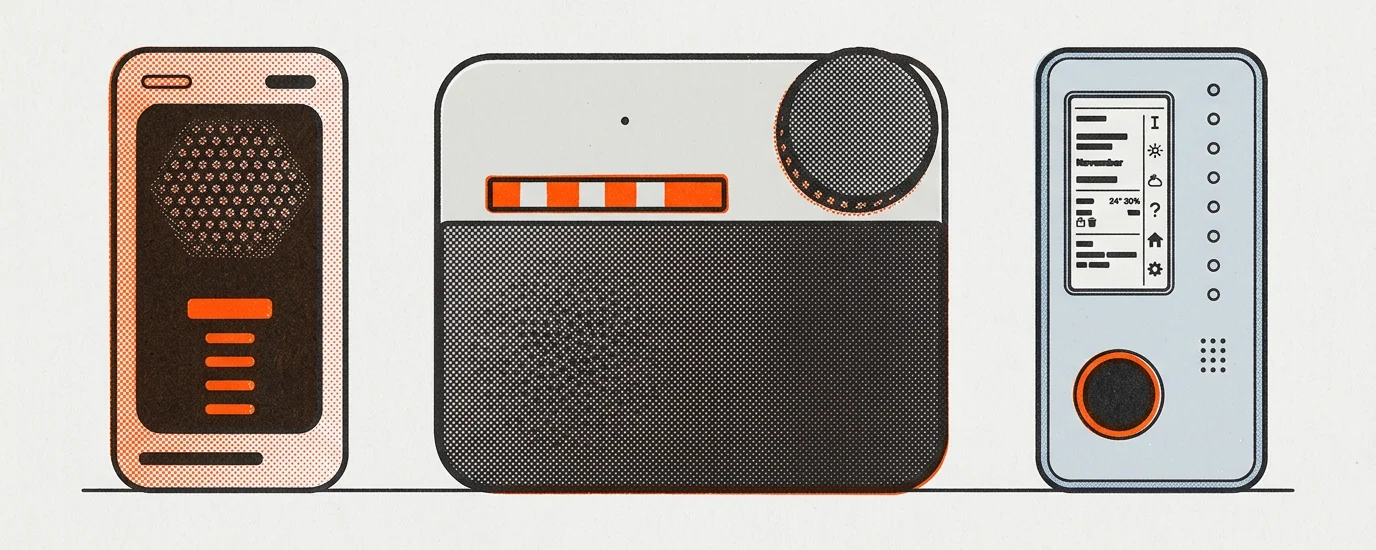
v1lever + touch key · mic, speaker, no screen
v2lever + wheel · mic, speaker, 8 LEDs
v3stick + four keys · e-ink, 8 LEDs, no speaker
v1 is the oldest. A lever on the side to talk, and one capacitive touch key to step. It has a speaker, no screen at all, and its status is a single board LED that blinks while a call rings and breathes while one is live.
v2 has the lever and a rotary wheel. Rolling the wheel picks a card and the whole LED strip takes that card’s colour for ten seconds; tapping it is Enter. The strip is eight LEDs behind a slot in the face, and it is the only device that can show me something while I am not holding it.
v3 has a three-colour e-ink panel, which takes about twenty-five seconds to redraw, so it is the device that shows rather than says. A four-key cluster plus a five-way stick: stick up and down moves the cursor, left and right turns the page. It knows which way up it is being held, because the top key and the bottom key swap depending on orientation. It has a beeper, not a speaker, which turns out to matter a lot later.
walnut is not a handheld. It is a head that sits on the desk with a servo jaw, LED eyes and a speaker, and its controls are two feet on its base: one to talk, one to step through its cards. It shares a dock with a small touchscreen that shows what it says, and it has its own writeup. Pressing the talk foot while it is answering cuts it off, which is the most human thing on the desk.
A fifth object, breathe, lifts a cap when something is waiting on me. It stays a one-feature device on purpose. Two more things get rows in the hub but are outside all of this: DialDash, the dial, and a speaker in the house.
Doubling on things
By the end of October 2026 each device had its own program on the Mac. Each program had its own link layer, its own speech-to-text, its own answering code, its own voice. Five of them started at login, two put icons in the menu bar, and settings lived in three different places.
What broke it was starting walnut. I wrote one line into the spec and it is the whole reason this project exists: now we’re doubling on things. For instance, now building Walnut, most of the features are already built.
Then, while mapping what was actually running, I found a helper that had been exiting with status 1 on every single run, with a cache file it had last written at the end of April. Nothing had told me. That is six months of a thing being dead on a desk I look at all day.
So the goal was not a dashboard. It was one menu-bar icon, one window, one thing started at login, and the rule that a broken service shows up in the hub, not on the device. How many processes run underneath does not matter as long as I never manage them by hand.
One catalog
There is one list of features. Thirteen things a card can be, and three things a device can show when idle. A feature is written once and every device that can run it gets the same one.
What a device can run is not my opinion, it is a hardware question, and the answer is computed. The grid below is the whole product on one screen: features down the side, devices across the top, a switch where the two can meet.
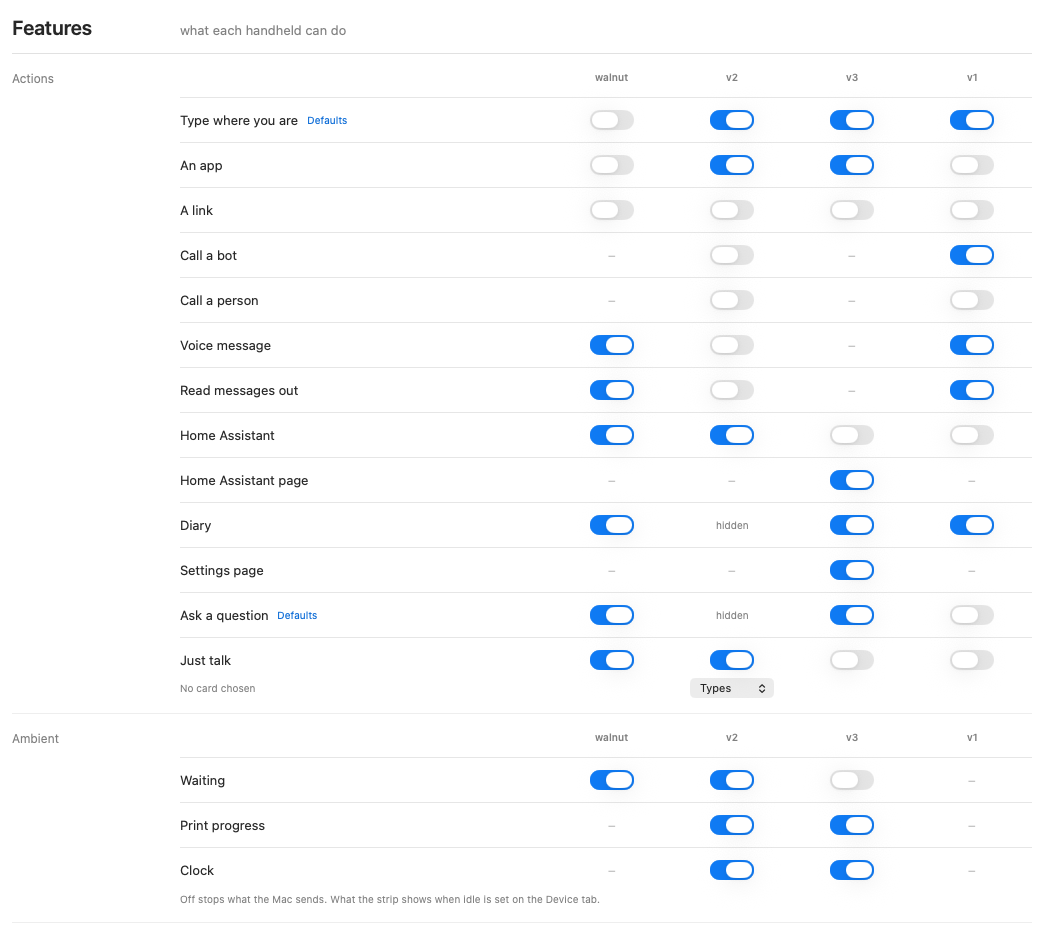
A dash means that device cannot have it, and hovering says why in plain words: needs a speaker, needs a screen, needs LEDs. v3 has no speaker, so it never gets Call a bot, Call a person or Read messages out, and that is the end of the argument. walnut gets a longer answer, because its limit is not the part but the firmware: needs walnut firmware for a call: it can’t talk and listen at once.
Two rules in there took a while to earn. A card a device already holds stays switched on even once it can no longer run it, so that I can still take it off; held beats greyed. And v3 is offered nothing at all until its firmware has reported which version it is, because the honest state of a device that has not spoken yet is not “old”, it is “unknown”, and nothing should be sent blind.
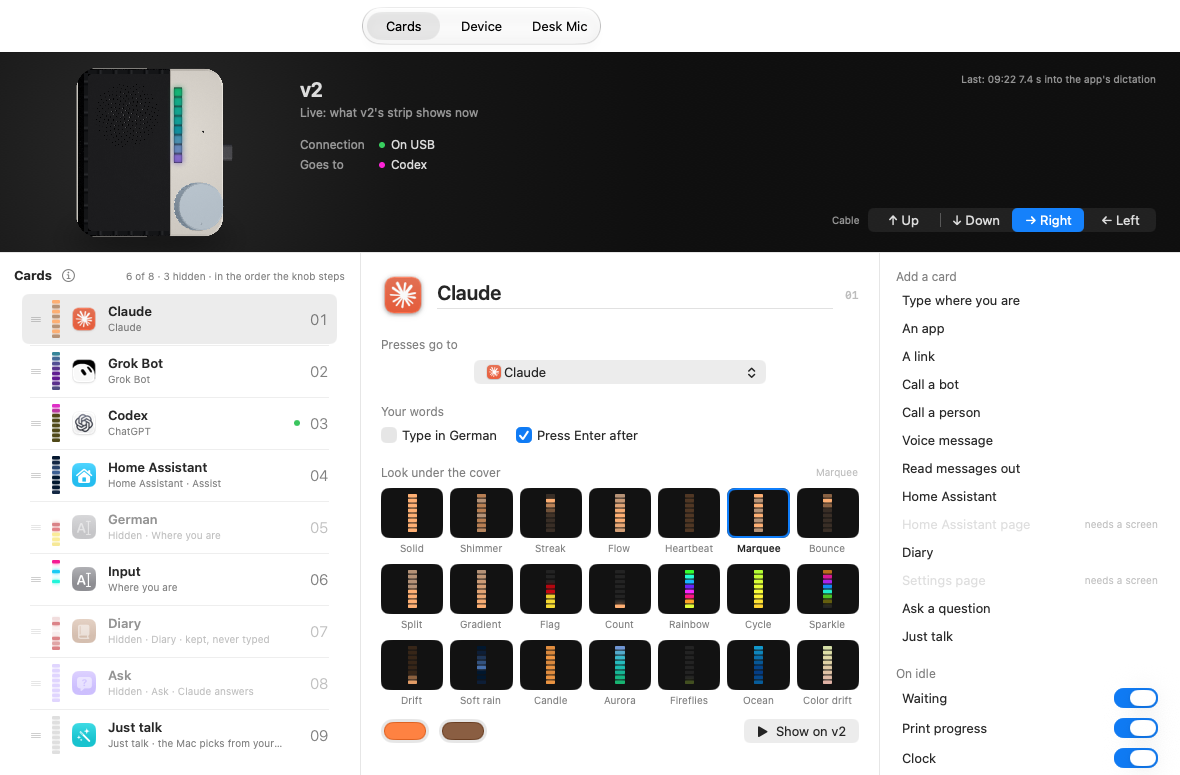
Each device then gets its own list, in the order it steps through them. The list even says which control does the stepping: in the order the knob steps on v2, the stick on v3, the touch key on v1, the second foot on walnut. The picture at the top is not a photo. It is the same render as above with the device’s live LED strip drawn onto it at calibrated coordinates, so what I see on screen is moving the way the thing next to my hand is moving.
A card can be hidden, which takes it off the device. A card can also be marked Just talk only, which takes it off the wheel but leaves it reachable by voice. That switch exists because walnut’s list was getting long with things I never step to, only speak to.
Just talk
Once there is one catalog, and the Mac knows every card a device holds, a new card becomes possible: a card that reads what I said and picks one of the others.
Squeeze, speak, release. The Mac transcribes the take, then a classifier scores the words against the cards this device already has. Not against everything it could ever do, against what is actually on that device right now, plus the people any device can message.
TALK_SURE = 0.60, tuned after a live testIt decides from the transcript, not the recording. Partly because sending audio to a classifier is billed at a fifty-second minimum per file, roughly ninety times the price of the text, and partly because typing, the house and messages all need the words anyway. There is no cache of decisions, on purpose: a timeout must never be remembered as an answer.
What it never offers is as considered as what it does. A call is not an option, because a call runs while the lever is held. Pages are not options. Just talk is not an option for itself. And a device without a speaker is never offered a voice message or a read-back, because it has no way to let me hear what it is about to send.
How it decides is a story of its own: the speech model, the plain-code rules that run before any model, the classifier, its fallback, and how the same call picks which Claude model answers. That is in the walnut writeup, under How Makana decides, because walnut is the device I use it on most.
Just talk is itself a card in the catalog, which means it can be renamed, coloured and ordered like any other. On walnut it sits first and I call it Makana. A per-device setting called No card chosen decides what an idle squeeze does when no card is selected: type, or Just talk. That setting exists because the first version of this let the Mac decide, and I asked, in those words, whether it was something I could control.
Never out loud on a guess
The spec for Just talk has a definition of failure that is stricter than its definition of success, and it is the thing I would keep if I had to throw the rest away: it has failed, even if it technically works, if a message or a house command runs that I did not mean, or words get lost, or something I set up today changes without me changing it.
So when the router is under the bar, it says its guess and waits. On v2 it says it out of the speaker and a press of the wheel is the yes. On v3 it draws the question. On the Mac the notch grows a small card: the guess as one big button, three other places as small tiles under it, what it heard in quotes, and a Clipboard button.
If nobody picks, nothing happens. That is a change I made three days after shipping it. The first version would run its own best guess when the window expired, and the list of card kinds allowed to do that is now empty, with a comment next to it saying a guess never runs by itself and every unpicked take is copied. Fifteen seconds of silence puts the words on the clipboard and the notch says so.
A few of these limits are not mine. The handheld gives up twenty-five seconds after I let go of the lever, and the Mac may answer it exactly once, so the whole budget is speech-to-text under five seconds, then the first classifier under four, then the fallback under three, then the route. v1 cannot say yes at all without a firmware change, because its firmware only opens a confirmation window after a voice message. Rather than change the firmware, v1 says “not sure” and the pick moves to the Mac’s notch. And over the plain network route a message always asks, even above the threshold, because there is no speaker there to read it back.
When nobody is talking
Three of the features in the catalog are not cards. They take no slot, they are not stepped through, and they are what a device does with its idle outputs when I am not holding it.
Waiting is the strip showing me what is waiting on a decision from me. The colours and the idea come from breathe, the desk object that lifts its cap for the same reason, but the list is read on the Mac rather than from breathe, because a breathe that is switched off or unreachable never empties them. It is deliberately a network-free piece of code; a test fails if it ever imports anything that can reach the internet. And if the list cannot be read, nothing is sent and the strip goes back to breathing after thirty seconds, because a list I failed to read is not the same as nothing waiting.
Print progress turns the strip into a green bar as tall as the 3D print is far along, and a sound in the room sends a ripple up it. If the house stops answering, nothing is sent, and the device drops a bar it has not heard about for three minutes rather than leaving a stale one lit. Switching the feature off sends one last “not printing” so the bar clears, then goes quiet.
Clock is a purple bar as far through the day as the day is, one LED for every three hours from midnight. Ten minutes without the Mac and it goes back to breathing on its own.
walnut’s screen gets one more thing: up to twelve tiles, each a label, a card and a saved phrase. A tap runs the phrase on that card as if I had said it.

Two card kinds are greyed out as tiles, with the reason written underneath: the diary and the translating cards need my voice, so they cannot be a saved phrase. It is the same rule as the feature grid, applied one level down.
The thing that keeps it alive
Desk Hub is the front. The engine is older and is called Desk Mic, and it is the program that actually holds the serial links, does the transcribing and runs the features. The hub gives it a tab and describes it exactly as what it is: the Mac side of the handhelds.
The hub runs each device’s program as its own child process. A crashed one is started again two seconds later, and if a thing exits three times inside a minute the wait backs off to ten, thirty, then sixty seconds, resetting once a run lasts five minutes. It refuses to start a service while the old login agent that used to run it is still loaded, because two copies fight over the same device. Quitting the hub stops the whole desk, which is the behaviour I asked for.
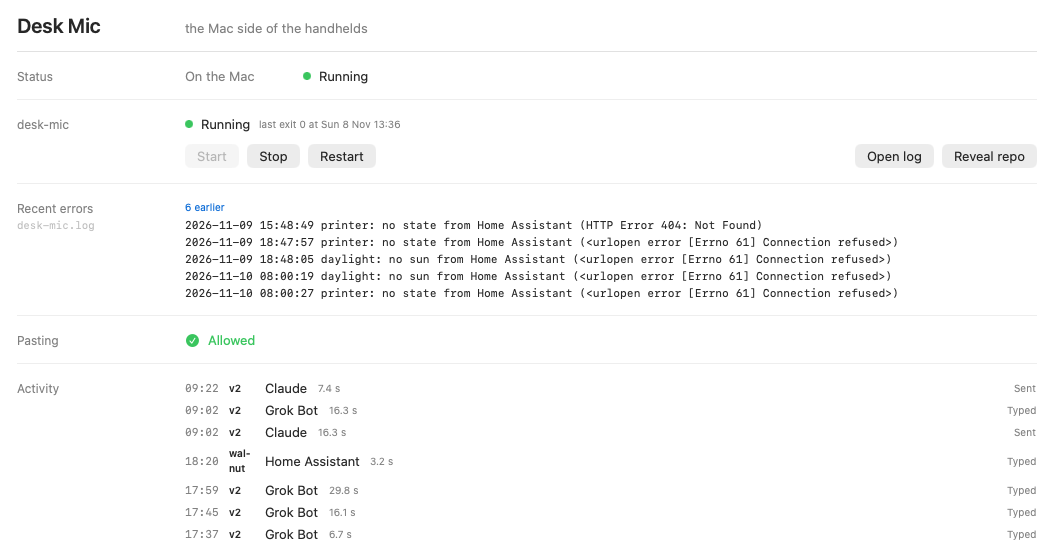
That errors panel is the entire point of the project, showing its work. It reads the tail of the log for the four words that mean trouble and lists the last twenty, collapsing repeats. The five it is showing are real and they are mine: the printer and the sun could not be read from the house. Nothing is broken enough to notice from the desk, which is exactly how the dead helper survived six months.
The cost of running every host as a child took a measurement to find. Unspecified, launchd throttles a background job and everything under it, and a four-millisecond sleep in a host becomes fifteen to thirty. That stretch held walnut’s speech below real time. The fix is five lines of configuration marking the hub interactive, and it brought those sleeps back to about five milliseconds.
The app itself has no project file and no dependencies. It is compiled by a shell script with the Swift that ships with the command line tools, which is why none of the modern SwiftUI conveniences are allowed anywhere in it; there is a lint rule that fails the build if one appears, because the build machine has no plugin to expand them.
What came out again
The version where the Mac chose what an unselected squeeze did lasted a few hours before it became a switch. The version where Just talk ran its own guess on a timeout lasted three days. v3 had a full-page list of what was waiting on me, and it was replaced by a four-line ledger of the shed, the printer, the air and the bins, because a page that takes twenty-five seconds to draw should answer more than one question.
The helper that had been dead since April did not get fixed. Its row was written, then deleted, and the thing was simply switched off. Two small command-line helpers the app used to carry were unbundled once the engine started building them itself, and a lint rule now fails the build if either comes back.
Four bugs are worth naming because each one left a rule behind. A clock counted in milliseconds since 2001 was divided and stuffed into a 32-bit integer, which overflowed and crashed the app on every frame of one LED animation; there is now a lint rule for that exact shape. Copying a new build over the installed app left files from the old one inside the bundle, breaking its signature, and a signature is what macOS keys the microphone and local-network permissions to, so the install now builds a fresh copy beside it and swaps. Every network call used the shared session with its sixty-second default, so an engine that accepted a connection and then stalled froze the menu bar for a full minute. And a second copy of the app launching at login waited a fixed one and a half seconds for the first copy to quit, which was less time than quitting takes; when it lost that race the desk came up with no services running at all and nothing to restart it.
That is nine lint rules now, and the file says what they are for in one line: each one guards a bug class that shipped once.
Related: walnut, DialDash and Blip & Eight.